
Appointment Management
View, filter, and manage all your appointments from one dashboard.
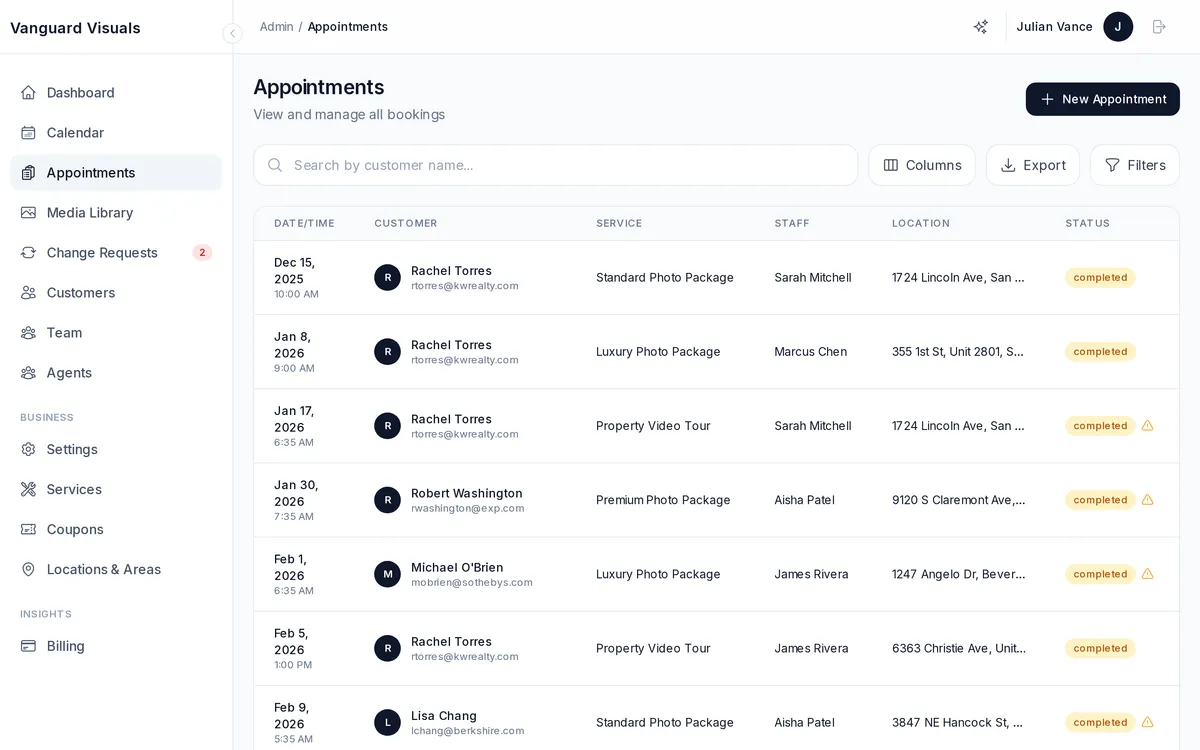
Viewing Appointments
The admin dashboard provides a full appointment list with:
- Filters — by status (pending, approved, completed, cancelled), staff member, location, date range, and free-text search.
- Customizable columns — toggle visibility of standard columns (date, status, service, customer) and agent-related columns (agent name, phone, email) and custom field columns.
- Bulk actions — select multiple appointments to delete or update status in batch.
Appointment Detail
Click any appointment to see the full picture:
- Customer info — name, email, phone, plus all custom field values (property address, agent details, etc.).
- Service details — selected package, extras, quantities, and total price.
- Payment history — payment method, status (pending/completed/refunded), amount, and adjustments.
- Staff assignment — which photographer/editor is assigned.
- Auto-edit status — if AI photo editing is enabled, see progress and review results.
- Notes — internal notes and customer-submitted notes.
Appointment Lifecycle
Appointments move through a standard lifecycle:
Pending → Approved → In Progress → Completed → Archived
At each stage, the appropriate notifications are sent (email and/or SMS) based on your notification settings. Appointments can also be cancelled or rejected at any point.
Calendar View
A visual calendar shows all appointments color-coded by status. Filter by staff member to see individual schedules. Useful for daily planning and spotting scheduling conflicts.