
Services & Pricing
Create service packages with pricing, add-ons, and customer group restrictions.
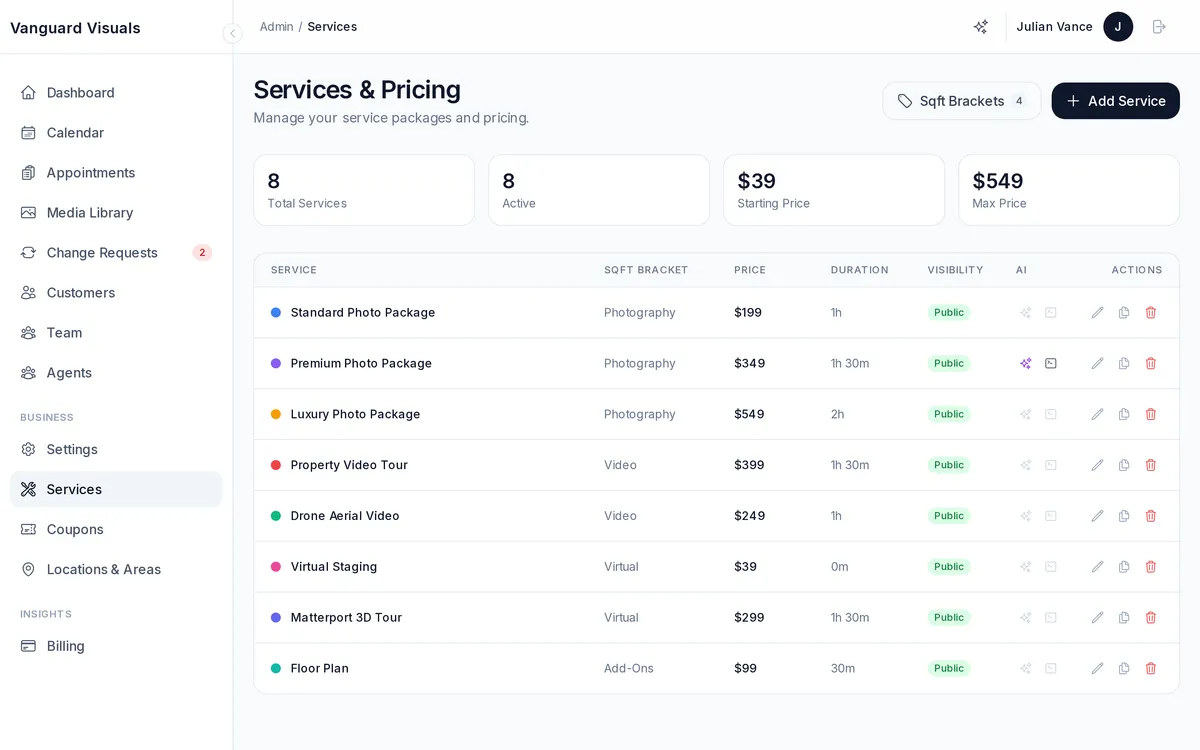
Creating Services
Define each service you offer with:
- Name and description — e.g., "Premium Interior Photography"
- Pricing — flat rate per session
- Duration — how long the shoot takes (used for scheduling)
- Capacity — how many concurrent bookings this service supports
- Category — organize services into categories
- Visibility — public (anyone can book), private (hidden from portal), or group-restricted (only specific customer groups see it)
- Staff preferences — assign which team members can perform this service
Service Extras (Add-Ons)
Extras are optional add-ons clients can select during booking:
- AI Suite extras — auto-edit, virtual staging, twilight conversion, declutter
- Marketing Kit extras — social media assets, print materials, property website
- Custom extras — anything you define (drone add-on, rush delivery, etc.)
Each extra has its own price, optional image, and can be quantity-based.